
Overview
This article covers the main reasons why searching for your dealership on Google and trying to find your own ad is unlikely to show a consistent result — and where to look instead for a reliable, accurate view of your ad performance.
Why Don't I See My Ads?
There are several reasons your ad may not appear when you search for it, ranging from how Google's auction works to your own search behavior. The most common are below.
Why doesn't my ad win every time someone searches for my dealership? (Ad Rotation & Auction Dynamics)
This is the most common reason. Google doesn't show your ad on every eligible search — every single search triggers a brand-new auction, and your ad won't necessarily win every one. Whether it does comes down to factors like:
- Bid competitiveness
- Quality Score
- Expected CTR
- Competitor bids
- Available budget
Even when your ad is eligible to appear, another advertiser can still win that particular auction.
Could my daily budget be limiting when my ad appears? (Budget Limitations)
If a campaign is budget-limited, Google paces delivery throughout the day rather than spending it all at once. If you happen to search at a time when that day's budget has already been spent — or when Google is intentionally conserving spend to pace evenly — your ad simply won't appear for that search.
Does Google prioritize showing my ads to certain audiences? (Audience Signals & Bid Adjustments)
Campaigns may prioritize delivery toward:
- New customers
- In-market shoppers
- Certain demographics
- Device types
Someone who repeatedly searches for the dealership without ever clicking may become progressively less likely to trigger an impression, since these signals shape who the auction favors.
Why do my search results look different from what my customers see? (Personalized Search Results)
Google customizes what each person sees based on:
- Search history
- Location
- Device
- Previous website visits
Because of this, what a shopper searching from their own device sees can look completely different from what you see when you search for the exact same terms.
Does searching for my ad repeatedly affect whether I see it? (Frequency of Searching & Shopper Behavior)
If you search for your dealership over and over but never click the ad, Google reads that as a signal that you're unlikely to engage — and may stop showing the ad to you as a result. Google analyzes online behavior to predict whether someone is a worthwhile shopper to spend advertising budget on, and repeated searches without a click "teach" the algorithm that you aren't a typical shopper.
Could my dealership's IP address be blocked from seeing our own ads?
When onboarding with Fullpath, you likely provided your dealership's IP address(es) on the Ad Preferences page of your Digital Advertising settings. We disable your dealership's IP address so you don't accidentally rack up ad spend on clicks that won't lead to conversions — every dollar spent on ads should be a dollar spent on getting you more customers.
Why don't my searches match the exact keywords used in my campaign?
As a professional in the automotive industry, the way you search for your own dealership doesn't necessarily match how your potential shoppers search. Fullpath uses Google's proven keyword choices and combinations to make sure the people actually looking for what you offer can find you — which means your own manual searches may not line up with the terms the campaign is actually targeting.
How Can I Make Sure My Ads Are Performing?
Manually searching for your own ad isn't a reliable way to check performance — the factors above mean an absence in your search results doesn't tell you much either way. Instead, we want to make sure you have full visibility into everything our CDXP does. The Digital Advertising Overview page in the Dashboard provides a comprehensive look into all the metrics that matter:
You can toggle through different metrics using the dropdown menus at the top of the page.
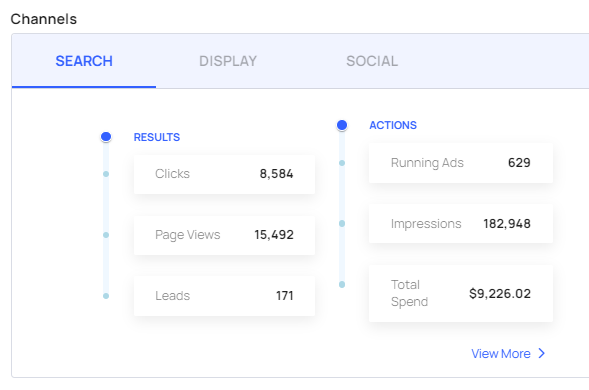
Further down the page, the Channels view provides a segmented look into your metrics by channel:
For further information on this topic, please feel free to reach out to your Customer Success Manager!