
Overview
This guide reviews the steps required to establish a Consent Management integration with Fullpath, what to expect at each stage of the process, and how the partnership works once your integration has gone live.
Fullpath's Consent Management Program aims to create a single source of truth for dealership communication-consent data. All updates for the dealership flow through the Fullpath Customer Data Platform (CDP), ensuring the dealership, Fullpath, and every integrated vendor share one consistent, up-to-date consent record for each contact point. As an integrated vendor, you will be able to send and receive bidirectional consent updates for phone numbers and email addresses on behalf of the dealerships.
Onboarding at a Glance
| Stage | What happens |
|---|---|
| 1. Legal | An agreement is signed by the vendor. Development can move forward in parallel, but an API-Key will only be provisioned after signing. |
| 2. Development | Build your integration against the API reference documentation. A test API Key can be requested if you need access to a sandbox environment. |
| 3. Key Provisioning | Fullpath provides an API authentication key for your organization and sends it as a link via email. |
| 4. Live Operation | Exchange consent updates with Fullpath on behalf of your integrated dealerships on an ongoing basis. Any marketing announcements promoting the integration would be made at this point. |
| 5. Added Dealers | As additional dealerships choose to integrate with you, your implementation contact is notified by email of each new dealer request. Dealers will see that the integration is connected after the first API call is made. |
The Process in Detail
Stage 1 — Legal Agreement
Fullpath integration requires the signing of a Non-Disclosure Agreement (NDA) and a Master Service Agreement (MSA). The agreement was attached in the introductory email and can be sent back to data-integrations@fullpath.com.
Stage 2 — Development and Integration
The API supports both retrieving and submitting consent data, allowing for bidirectional communication updates between your system and Fullpath's CDP.
Your development team should work from the companion documents:
- The Consent Management API Documentation reference contains the full technical documentation
- The Integration Tutorial Guide attached to the introductory email walks through how the endpoints fit together and recommendations how to use them
There are two options for development based on the preference of the Vendor. Either begin to develop using a live mutual dealer, or reach out to the Fullpath contact and we will issue sandbox credentials for testing.
Stage 3 — API Key Provisioning
Once the legal process is complete, and the vendor development team is ready, the Fullpath team will provision an API authentication key for your organization. You will receive a secure link to this key via email.
- Keys are valid for 180 days, after which the key requires rotation for security purposes.
- Two weeks prior to expiration, you will receive an email reminder prompting you to rotate the key. Details on how to rotate will be provided in that email.
The integration will be considered live once Fullpath has received successful API calls for at least one dealer.
Stage 4 — Live Operation
Once live, every consent update you send is stored in Fullpath's CDP. Dealership's can see all of the changes inside their Fullpath dashboard and track the updates flowing into the ecosystem, both from your integration and from all other integrated vendors.
Stage 5 — Supporting Additional Dealers
Your integration is not limited to the dealerships you launch with. If at any point additional dealerships choose to integrate with you, an email will be sent to your designated implementation contact informing you of the additional dealer request.
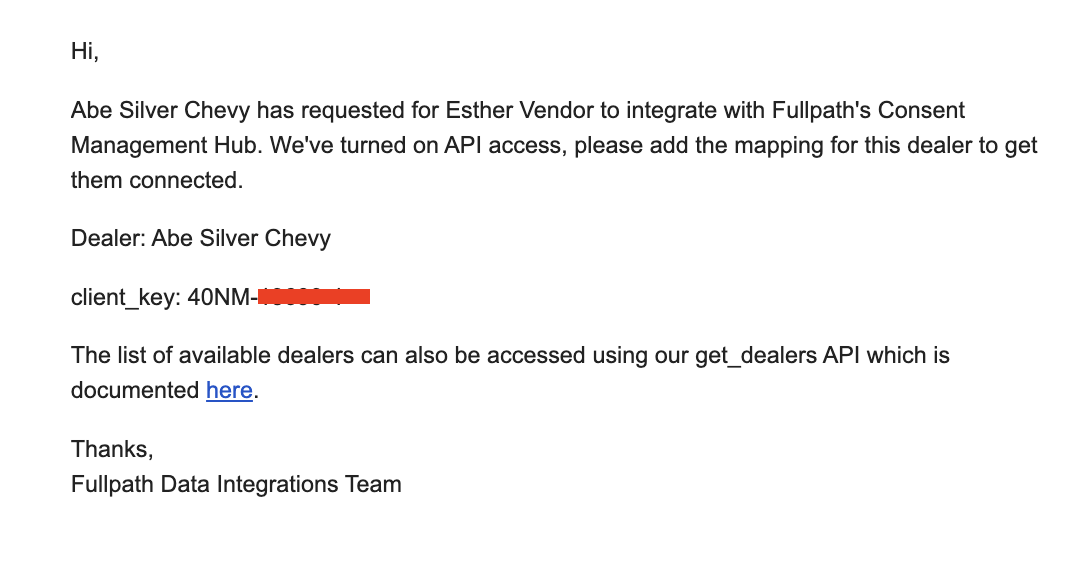
No new integration work is needed on your side. The same endpoints and API key serve every dealership. Once connected, the new dealership appears in GET /dealers with its own client_key, which you use to exchange consent updates for that dealer. The client key and dealer name will also be included in the email as an additional method to map mutual dealerships.
Sample Email sent to vendor when a Dealership requests integration:
Sender: Fullpath Data Integrations (data-integrations@fullpath.com)
Subject Line: Integrate with Fullpath Consent Management
Questions
For anything related to onboarding, legal, or key provisioning, contact Fullpath's Data Integration team at data-integrations@fullpath.com.